Shilpi 2.6: export your Code Hub as a plugin, and a licence you can read in one minute
Shilpi 2.6 adds Export as plugin to the Code Hub, so custom post types and functions can leave the theme in one click, plus a clearer split licence and Lifetime pricing.
This release came straight out of a real client conversation. A business owner moving a large Lovable site to WordPress asked us the questions every careful buyer should ask about a newer theme: who can maintain this site, what exactly do I receive, and what happens if I ever leave? Some of our answers were good. One of them needed better tooling. Shilpi 2.6 is the result.
New: Export as plugin
The Code Hub is where a Shilpi site keeps everything a classic theme would put in functions.php: custom post types, taxonomies, meta fields, shortcodes and small functions, each as a named, syntax-checked snippet. Until now that code ran only while the Shilpi theme was active. That is normal for themes, and it is exactly what makes clients nervous.
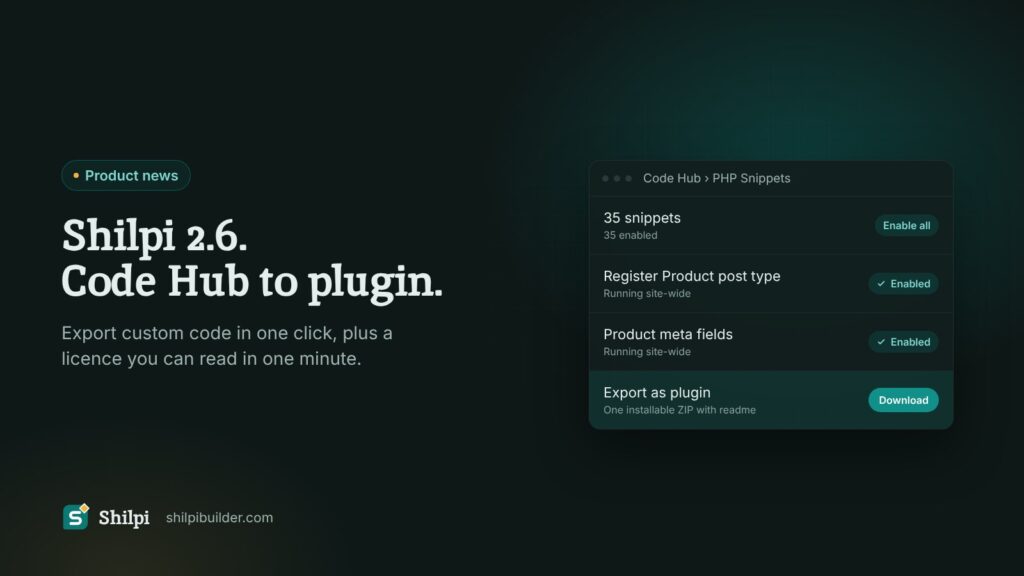
In Shilpi › Code Hub › PHP Snippets you now get three bulk actions:
- Enable all and Disable all switch every snippet at once.
- Export as plugin packages every enabled snippet into one installable WordPress plugin, with the steps written into its
readme.txt.
Moving the code out of the theme takes four steps: export and activate the plugin, click Disable all, check the site, then switch or remove the theme. If anything looks wrong, Enable all hands control straight back to the theme.
We tested the full path on a site with a custom post type and a shortcode, finishing on Twenty Twenty-Five with only the exported plugin active. The post type stayed registered and the shortcode kept working. The release also adds 38 new automated tests for this feature.
You no longer have to decide on day one whether code lives in the theme or in a plugin. Build in the Code Hub, export when independence matters.
What the export does not do
The plugin carries PHP snippets only. Page and template designs, Global CSS and JavaScript, custom HTML and form submissions belong to the theme. A snippet that calls a Shilpi class or function cannot run without the theme, so the export flags it and lists it separately in the readme. The Code Hub reads up to 100 snippets at a time.
Clearer: the licence and the package
The same conversation showed us that “commercial theme” is not a precise enough answer. The Terms now state it exactly:
- Shilpi’s PHP is GPL, version 2 or later. It ships readable: only comments are removed.
- The JavaScript, stylesheets, visual builder and design assets are proprietary, delivered minified, and may not be copied, resold or reused in another product.
- Third-party components keep their own licences, listed in
THIRD-PARTY-NOTICES.md.
The new Ownership, licence and maintenance page lists what is in the theme ZIP file by file type, what you and your clients own, and what a developer needs to maintain a Shilpi site. It is the page to send a client before a project starts.
Renamed: one-time is now Lifetime
A one-time licence was always a single payment with updates and support for as long as Shilpi ships. We now call it what it is: a Lifetime licence, from $50 for one site. Yearly licences start at $20 and can be upgraded to Lifetime later for the difference. See Pricing.
Why this matters for client work
When you build a client site, you are also making a promise about the years after launch. With 2.6, that promise is easier to keep and easier to explain: the content is standard WordPress, the pages are plain HTML and CSS, the PHP is readable, and the custom code can leave the theme in one click. For the full walkthrough, read Where your content lives in a Shilpi site.