Where your content lives in a Shilpi site, and why it outlives the theme
If a theme disappears one day, what happens to your products, fields and content? How Shilpi stores a site in standard WordPress, and what changes if you ever switch theme.
Almost every careful client asks the same question before they agree to a new theme: if this theme disappears one day, what happens to my products, my fields and my content? It is the right question. The WordPress Plugin Handbook gives the same advice developers have repeated for years: register your content model in a plugin, not only in a theme, because a theme switch should change how a site looks, not what it contains.
This post answers that question for Shilpi plainly, including what you need to do if you ever leave the theme.
Why clients ask for a separate plugin
Most themes that register custom post types do it inside the theme’s own functions.php. Switch the theme and the post type stops being registered. The data is still in the database, but the Products menu vanishes from the dashboard and the product pages return 404. Clients who have lived through that once, or read about it, ask for a separate “site plugin” by reflex.
A theme should decide how a site looks. It should never be the only thing that knows what the site contains.
How Shilpi stores a site
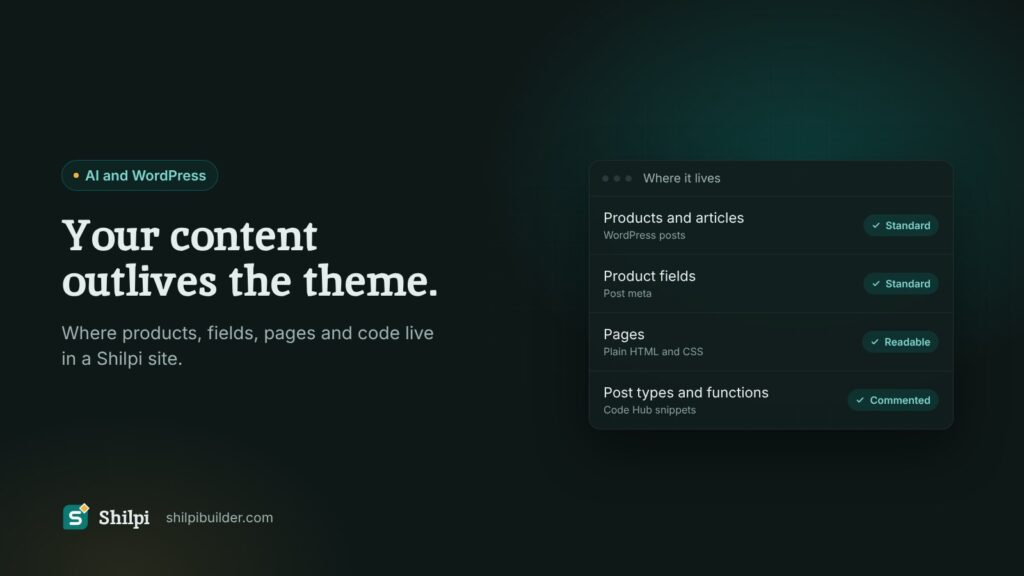
Shilpi was built so that each layer of a site lives in standard WordPress, in a place you can read:
- Content is standard WordPress data. Products, articles, taxonomies and custom fields are ordinary posts, terms and post meta in the WordPress database. No builder format, no shortcodes, no serialized layout blobs.
- Pages are plain HTML and CSS. A page designed in Shilpi is saved as readable HTML in the post content, with its CSS alongside. Any developer can open it and understand it.
- Templates are HTML with simple tokens. A product template reads like
{post:title}and{post:meta:weight}. Nothing is hidden behind a proprietary widget. - Code lives in the Code Hub. Everything a classic theme would put in
functions.php, such as registering a post type or a meta field, lives in the Code Hub as separate, named PHP snippets, each written for one job and commented so its purpose is obvious.
What makes the Code Hub safer than functions.php
- One snippet, one job. “Register Product post type” and “Product meta fields” are separate entries, not two hundred lines buried in one file.
- Validated before it runs. A PHP snippet is syntax-checked and test-run before it can be enabled, and a fatal-error sentinel protects the site, so a typo cannot white-screen it.
- PHP writing is off by default. It is a temporary permission under Shilpi › Security, and one button closes it again when the build is done.
- Readable by people and by AI. The Code Hub is exposed to your AI agent through Shilpi’s MCP server, so an agent can list the snippets, read exactly what each one does and explain it, without filesystem or SSH access.
- One click to switch, one click to export. Enable all and Disable all turn every snippet on or off at once, and Export as plugin downloads all enabled snippets as a ready-to-install WordPress plugin.
- It does not depend on a licence. The Code Hub keeps working if a licence lapses. Only the AI layer, updates and support need an active key.
What happens if you change theme
The Code Hub belongs to the Shilpi theme, so on its own its snippets stop running when the theme is switched off. Your data is never touched, but the post type registration has to keep running somewhere. Since Shilpi 2.6.0 that takes a few minutes and no code at all:
- Export as plugin. In Shilpi › Code Hub › PHP Snippets, click Export as plugin. Every enabled snippet is packaged into one plugin ZIP. Upload and activate it; nothing changes on the site yet.
- Disable all in the Code Hub. From the next page load, the plugin runs the code instead of the theme.
- Check the site. If anything looks wrong, click Enable all and the theme takes over again instantly.
- Switch or remove the theme. Your post types, taxonomies, fields and functions keep working from the plugin.
The same steps are written into the plugin’s own readme.txt. We tested the full path on a site with a custom post type and a shortcode, finishing on Twenty Twenty-Five with only the exported plugin active: the post type stayed registered and the shortcode kept working.
Two things to know. The exported plugin carries PHP snippets only: page and template designs, global CSS and JavaScript, custom HTML and form submissions belong to the theme layer. And if a snippet calls a Shilpi class or function, it cannot work without the theme, so the export flags those snippets and lists them separately in the readme.
What stays without any work: every product, article, field value, image, URL and SEO setting. What gets rebuilt: the visual templates in whatever the new theme uses. That is the same trade-off as leaving any page builder, with one difference: your pages are already plain HTML, not builder data that only renders while the builder is installed.
When a separate site plugin makes sense
Sometimes a client wants the content model completely independent from day one, and that is a reasonable choice, not a sign of distrust. With Shilpi you no longer have to choose at the start: build in the Code Hub, where snippets are easy to read, test and edit with AI, and export them as a plugin whenever independence matters. The plugin then owns the post types, taxonomies and fields, and Shilpi owns the presentation. Templates read the same post meta either way, so nothing in the design changes.
For most sites the Code Hub is enough, and simpler to maintain. For organisations that plan years ahead or switch agencies often, one export turns it into a standalone plugin. Both are standard WordPress, and both keep your content yours.